
Guide
Buying a used iPad: how to avoid bad buys
Used and refurbished iPads are often much cheaper than new ones. With the right checks you'll get a reliable device – and avoid locked or outdated tablets.
Updated 7 min readEditorial team wotablet.de
Why used iPads are so popular
iPads are durable, in our experience receive software updates for many years and hold their value well. That's why there's a big market for used devices – from private sales to professional refurbishers who test, clean and sell tablets with a statutory warranty. For families, pupils or as a second device, a used iPad is often the most economical solution.
The flip side: listings vary greatly in condition, age and specification. If you keep the following points in mind, you'll buy much more safely.
Warranty: dealer or private seller?
If you buy from a business seller in Germany, you have a statutory warranty claim even on used goods. The period is generally two years; for used goods the dealer may shorten it to one year if this is expressly agreed. If a defect appears within one year of delivery, it's presumed in your favour that it already existed at the time of purchase.
With a private sale, the warranty can be excluded – this is common with classified ads and private auctions. You then bear the risk of hidden defects. With more expensive models such as the iPad Pro or a current iPad Air, buying from a dealer is therefore especially worthwhile.
Refurbishers often also offer their own guarantee. This is a voluntary extra and doesn't replace the statutory warranty.
Refurbished iPads from dealers
Ad All products linked with "View offer" are commission (affiliate) links: if you buy through them, we earn a commission – the price stays the same for you. As an Amazon Associate and eBay Partner Network affiliate we earn from qualifying purchases. Learn more
 Ad
Ad Ad
Ad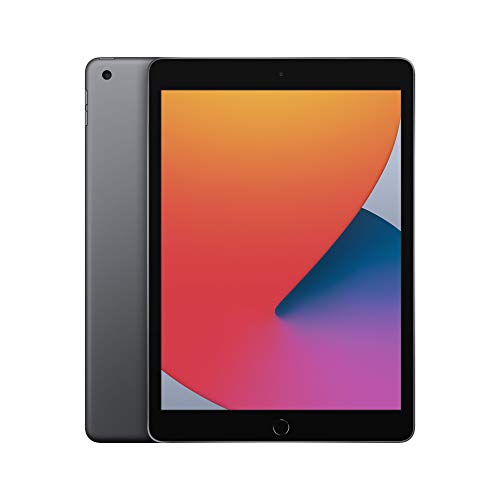 Ad
Ad Ad−5%
Ad−5%Activation Lock: the most important check
If Find My is enabled on an iPad, it's tied to the owner's Apple Account. After a reset, the device then asks for their login details – without them it's practically useless. Reputable sellers sign out before selling and remove the device from their account.
When buying in person, have the iPad reset and check that you can set it up without someone else's Apple Account. When buying online, look for a clear assurance that there's no Activation Lock and check the device immediately on arrival. Listings with notes like “iCloud gesperrt” (iCloud locked), “Aktivierungssperre” (Activation Lock) or “nur für Teile” (for parts only) aren't bargains but spare-parts donors.
Generation and update outlook
Age determines how much longer you can use the iPad safely. Very old models – such as early iPad Air or iPad generations – no longer receive current iPadOS versions, and some apps require a newer system version after a while. So before buying, check the highest iPadOS version the device supports. You can find the generation from the model number (A number) on the back or in Settings.
As a rough guide: the newer the generation and the more powerful the chip, the longer the device is likely to remain usable. A used model from recent years usually makes more sense than a very old device at a rock-bottom price.
Used and new iPad Air compared
Ad All products linked with "View offer" are commission (affiliate) links: if you buy through them, we earn a commission – the price stays the same for you. As an Amazon Associate and eBay Partner Network affiliate we earn from qualifying purchases. Learn more
 Ad−15%
 Ad
Ad Ad
Ad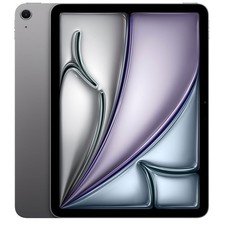 Ad
AdCheck the battery, display and ports
The battery is a wear part. Ask about the remaining capacity or the number of charge cycles – some dealers state them. An iPad that loses charge noticeably after a short time or switches off unexpectedly will soon need a new battery. A professionally replaced battery is a plus on refurbished devices.
On the display, check for scratches, cracks, pressure marks, bright spots and dead pixels. Test the touchscreen right up to the edges, for example by dragging an app icon across the whole screen. Also check the charging port, speakers, microphone, cameras, Touch ID or Face ID, and the buttons.
- Ask about battery capacity or charge cycles.
- Check the display for scratches, cracks and spots.
- Test the touchscreen at the edges.
- Try out the ports, cameras, speakers and buttons.
- With Cellular models: rule out a SIM lock.
Storage, box contents and accessories
Many older iPads come with 32 or 64 GB. That's enough for streaming and a few apps, but quickly gets tight with system updates and photos. If possible, choose at least 64 GB, ideally 128 GB. Also check whether a cable and charger are included, and whether any accessories sold with it, such as a Pencil or keyboard, match the generation in question. Accessories for older generations don't automatically fit newer iPads, and vice versa.
Where to buy used iPads
The widest choice is on marketplaces such as eBay, where both private and business sellers are active. Look for the “gewerblicher Verkäufer” (business seller) label, the ratings and the return conditions. eBay listings with a “Refurbished” condition in grades such as “Excellent”, “Very good” or “Good” are reconditioned devices from dealers who must meet defined requirements for testing and guarantees.
There are also specialist refurbishers that sell only reconditioned electronics, as well as the refurbished ranges of large online retailers. Apple itself also sells refurbished devices with a manufacturer's warranty in its online store, though the selection is limited and changes.
Classified ads are often the cheapest but offer the least protection. If you buy privately, meet in person if possible, test the device on the spot, have it reset in front of you and only pay then. Avoid paying strangers in advance without buyer protection.
- Marketplace: wide choice; look for business sellers and ratings.
- Refurbisher: tested, with a statutory warranty and often an extra guarantee.
- Private: cheap, but without a warranty – only with an in-person test.
After buying: the first steps
Check the iPad thoroughly as soon as it arrives, while return periods are still running. When buying online from business sellers in the EU, you generally have a 14-day right of withdrawal. Set up the device from scratch, install all available iPadOS updates and test charging, Wi-Fi, cameras, speakers and the touchscreen. A quick look in Settings under “General > About” shows the model, serial number and storage – compare these details with the listing.
Then make a backup in iCloud or on your computer and turn on Find My yourself. That way the device is protected if it's lost or stolen. If the iPad is for children, set up Screen Time and a separate child account in Family Sharing straight away. For older models, a new protective case is also worth it, as drops are the most common cause of display damage.
You can also use the serial number on Apple's website to check whether the manufacturer's warranty is still valid. If you notice any defects, document them with photos and contact the seller immediately.
Typical warning signs in listings
A price far below the market level is the most common warning sign. Behind it there are often locked devices, hidden defects or simply fraud. Also be wary of phrases like “für Bastler” (for tinkerers), “no guarantee of function”, “display has slight spots” or “weak battery”. If there are no photos of the device switched on, or only catalogue images are shown, ask for real photos. Reputable sellers answer questions about the battery, condition and Activation Lock openly and quickly.
Checklist for buying used
Before you click “Buy” or hand over any money:
- Prefer dealers with a statutory warranty; read the condition grade.
- Rule out Activation Lock – the device must be set up without someone else's Apple Account.
- Check the generation and the highest supported iPadOS version.
- Check battery health and the display.
- Storage: at least 64 GB, ideally 128 GB.
- Clarify accessory compatibility.
- Compare with the current new price of the entry-level iPad.
FAQ
What's the most important thing to check when buying a used iPad?
Activation Lock: the iPad must no longer be linked to the previous owner's Apple Account. After that come the generation, battery and display.
Do I get a warranty on used iPads?
From a business seller in Germany, yes – at least one year if they've validly shortened it, otherwise two years. With a private sale, it can be excluded.
How old can a used iPad be?
It should still support current or at least fairly recent iPadOS versions. Very old models are cheap, but app compatibility and security suffer.
How do I check an iPad's battery?
Depending on the version, iPadOS doesn't show battery health directly on every model. Ask the dealer about capacity or charge cycles and watch how quickly the battery drains in use.
What does “Condition: Good” mean for refurbished devices?
Usually visible signs of wear such as scratches, with full functionality. “Very good” and “Excellent” mean fewer marks – the exact definition depends on the dealer.